Connections · Cloak Forge Launcher add-on
Cloak Forge Email
Reads your inbox, drafts replies, and can send them for you — on rules you set, running on the model you already have.
What it is
Cloak Forge Email is the first Connection for the Cloak Forge Launcher — a separate module that plugs into the same local model instead of bringing its own. It borrows the mail account you already have configured (IMAP/SMTP, stored in your Mac's own Keychain) and gives you a fast, keyboard-driven inbox with AI drafting and optional automation on top.
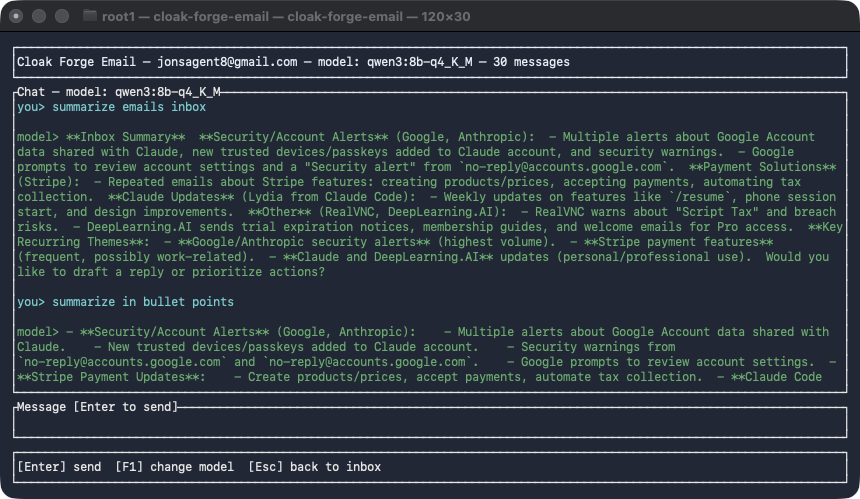
Ask it anything about what's in your inbox — it answers from what's actually there.
What it does
- Reads your real inbox. Connects over IMAP, read-only by default — it never deletes or moves anything on its own.
- Talk to it directly. A chat screen where you ask for what you want in plain language — summarize what's new, find a specific message, draft a reply in a particular tone — and it answers from what's actually in your inbox, not a guess.
- AI-drafted replies, reviewed before sending. Open any message and generate a draft reply. You see the exact text before anything goes out, and sending is always a separate, explicit confirmation.
- Rules you turn on yourself. Set up matching (by sender, by subject) with an action — a fixed reply or an AI-drafted one — for messages that should handle themselves. Every rule starts switched off; turning one on is a deliberate step, never a side effect of creating it. Every auto-sent message is logged so you can see exactly what went out and why.
- Same model, your choice. Pick which of your downloaded models drives it, independent of what the Launcher itself has active.
Why a Connection, not its own app
It doesn't run its own copy of anything — no separate model to download, no separate account to sign into beyond the mail account you already have. It's a thin, purpose-built layer on top of the Launcher's local model, which is the whole point of Connections: one local AI setup, several tools that share it.
Privacy: its AI uses only the Launcher’s private local AI, and it checks that it’s really talking to the Launcher before sending anything. Your mail itself goes through your email provider, which sees what you send, as it does today. How privacy works.
Pricing: not yet set — get in touch if you want to hear when it's available.